

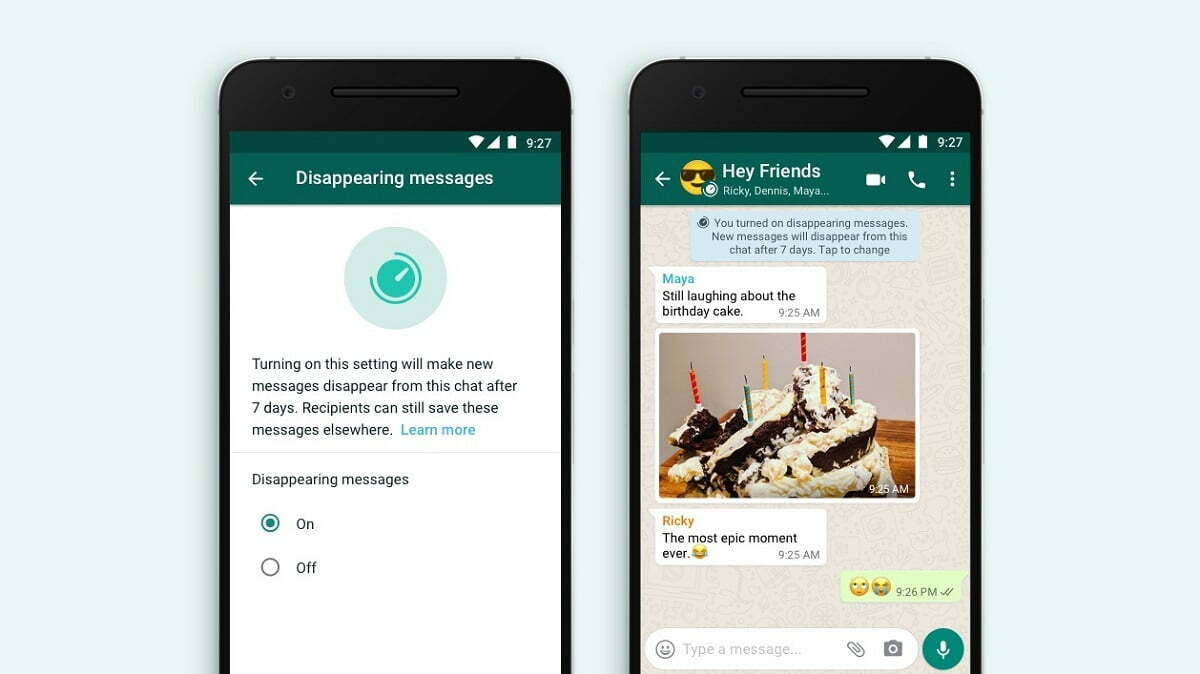
WhatsApp has rolled out a new Disappearing Messages feature for its users. This feature will delete your old messages within 7 days. That is, your messages will disappear on their own. The company will rollout this feature soon.
There has been a discussion for quite some time that the instant messaging app WhatsApp is working on a new feature Disappearing Messages and it can be introduced soon. At the same time, the company has finally officially launched this feature, putting an end to all the discussions. It will be rolled out to all users by the end of this month. Disappearing Messages feature will automatically delete old messages and chats on your WhatsApp. That is, with the help of this feature, the messages of users will automatically disappear.
Facebook-owned company WhatsApp has shared information about the introduction of its new Disappearing Messages feature through Facebook’s official Twitter account. According to the information given on the company’s blog post, Disappearing Messages will automatically delete users’ old messages and chats after reading them.
Messages will be deleted within 7 days
The feature of the Disappearing Messages feature is that it automatically deletes the messages coming on your WhatsApp within 7 days. Explain that it works exactly like the features present on Gmail, Telegram, and Snapchat. If you use these platforms, then you must be aware that the Disappearing feature is already present in them.
Disappearing feature has to be activated
If you want to use this feature, then for this you have to go to your WhatsApp account and activate it. If you turn on the Disappearing Messages feature, your chat will automatically disappear within 7 days. If you do not want to make your chat disappear, you can also turn this feature off. This facility will be available on one to one chat. But in a group, this feature will be completely under the control of A Admin.
The company says that it’s starting with seven days because it seems like an appropriate window for its users to finish a particular conversation while giving them the peace of mind that the conversations aren’t permanent. “We’re starting with 7 days because we think it offers peace of mind that conversations aren’t permanent while remaining practical so you don’t forget what you were chatting about. The shopping list or store address you received a few days ago will be there while you need it, and then disappear after you don’t,” the company said in a statement.
The Disappearing Messages feature has to be enabled separately for each chat window — individual or group conversations — and can be accessed by clicking the name of the individual contact or the group on WhatsApp. When enabled, the new messages sent by a user will disappear for the selected contacts after seven days. However, the preview of disappearing messages might display in notifications until WhatsApp is opened on the receiving devices. Disappearing messages that are forwarded to a new chat window, which has the option turned off, won’t be removed either. And when a user replies to a disappearing message, the quoted text might also remain in the chat after seven days.
Users receiving the messages can also still copy the text and take screenshots of the messages within seven days. Disappearing messages will also land in user backups but will be deleted after the user restores messages from it. Given that there are many ways to retain chats shared through disappearing messages, it seems more like an option to clear up conversations than a feature to share information that deletes automatically.

Apart from Telegram and now WhatsApp, other messaging apps to have similar functionality include Signal and also Facebook Messenger which now has a vanish mode.
What is Disappearing Messages
You can send messages that disappear on WhatsApp by enabling disappearing messages. Once enabled, new messages sent in the individual or group chat will disappear after seven days. The most recent selection controls all messages in the chat. This setting won’t affect messages you previously sent or received in the chat. In an individual chat, either user can turn disappearing messages on or off. In a group chat, only group admins can turn disappearing messages on or off.
- If a user doesn’t open WhatsApp in the seven day period, the message will disappear. However, the preview of the message might still be displayed in notifications until WhatsApp is opened.
- When you reply to a message, the initial message is quoted. If you reply to a disappearing message, the quoted text might remain in the chat after seven days.
- If a disappearing message is forwarded to a chat with disappearing messages off, the message won’t disappear in the forwarded chat.
- If a user creates a backup before a message disappears, the disappearing message will be included in the backup. Disappearing messages will be deleted when a user restores from a backup.

Note: Only use disappearing messages with trusted individuals. For example, it’s possible for someone to:
- Forward or take a screenshot of a disappearing message and save it before it disappears.
- Copy and save content from the disappearing message before it disappears.
- Take a photo of a disappearing message with a camera or other device before it disappears.
Media in disappearing messages
By default, the media you receive in WhatsApp will be automatically downloaded to your photos. If disappearing messages are turned on, media sent in the chat will disappear but will be saved on the phone if auto-download is on. You can turn auto-download off in WhatsApp Settings > Data and Storage Usage.
