


WhatsApp Android users can also enable the fingerprint lock option, time can be set from immediately to 60 minutes of application exit.
WhatsApp Messenger is a freeware, cross-platform messaging and Voice over IP service owned by Facebook. It allows users to send text messages and voice messages, makes voice and video calls, and share images, documents, user locations, and other media. It is undoubtedly the most popular app on Android right now and most of India communicates through it.
People exchange pleasantries, photos, videos, casual chats, jokes, information and a lot more important stuff through the messenger app. Hence, it was only fitting for WhatsApp to let people secure their texts with more secure biometric verification systems, given that the platform is currently under the scanner for privacy reasons.
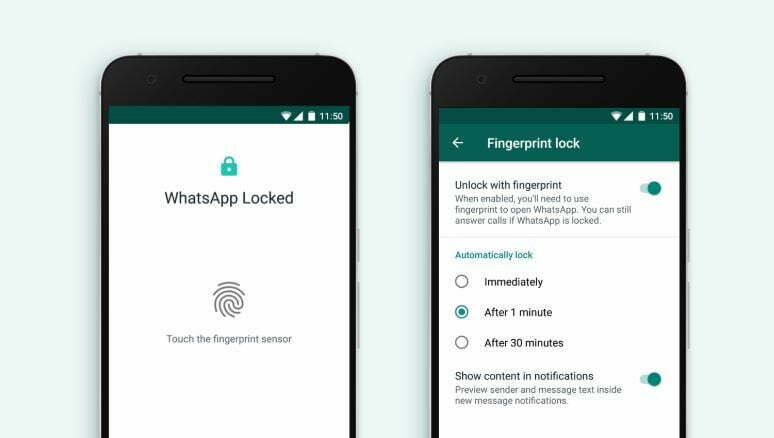
In order to provide an extra level of security, WhatsApp has rolled out fingerprint lock for android users. The latest feature will help users with add on protection to their chats from getting hacked or spied upon. The Facebook-owned platform had earlier introduced the feature on iOS devices.
Fingerprint unlock on WhatsApp for Android works like the Touch ID mechanism on iPhone. Users can use their fingerprints as an authentication tool to open the messaging app. WhatsApp also allows users to choose the time after which the app would automatically get locked when not being used. If not immediately, users can set a time interval that ranges between a minute to 30 minutes.
Speaking on the feature, the messaging platform said in a statement,
Earlier this year, we rolled out Touch ID and Face ID for iPhone to provide an extra layer of security for WhatsApp users. Today we’re introducing similar authentication, allowing you to unlock the app with your fingerprint, on supported Android phones.
To experience the latest feature, users need to update their app to the latest version. Once the app is updated, users can head over to the Settings > Privacy > Fingerprint lock and scan your fingerprint to confirm the authentication. Once the fingerprint is enabled, users will only be able to access chats by authenticating using their fingerprint. They can, however, still reply to messages from the notification shade and answer calls even when the app is locked. Users who use the app frequently can also select an option to delay the fingerprint lock. The options available are Immediate, After 1 minute, and after 30 minutes. Detailed step by step process mentioned below.
Step by Step to Activate Fingerprint Unlock for WhatsApp on Android
- Update your WhatsApp app to the latest version from the Google Play Store and ensure you have registered fingerprints for unlocking via the fingerprint sensor
- Open the WhatsApp app on your phone and tap on the ‘three-dot menu’ on the top-right corner and click Settings.
- Under Settings, navigate to Account and then under the Privacy section, you will find the Fingerprint Lock option. Tap on it to open the option.
- Switch on the toggle ‘Unlock with Fingerprint’ and the phone might ask you to input your fingerprint once. After doing that, your WhatsApp is now protected with the fingerprint sensor.
- You can also set a time limit for WhatsApp to lock the app after you exit, you can choose the app to lock it be default immediately or you can choose time limits of at least 1 minute or at most 30 minutes after you exit from the app.
- There is an additional option like whether you want the app to show the message content in the notifications.
- Now you are set. Every time you open WhatsApp, you will have to touch the fingerprint sensor on your phone to authenticate and open it.
WhatsApp for iPhone allows users to unlock the app using Face ID on iPhone X and later. Face Unlock feature is yet to make its way on the Android app.

2 Comments
Thank you ever so for you article post.
That is very interesting.