

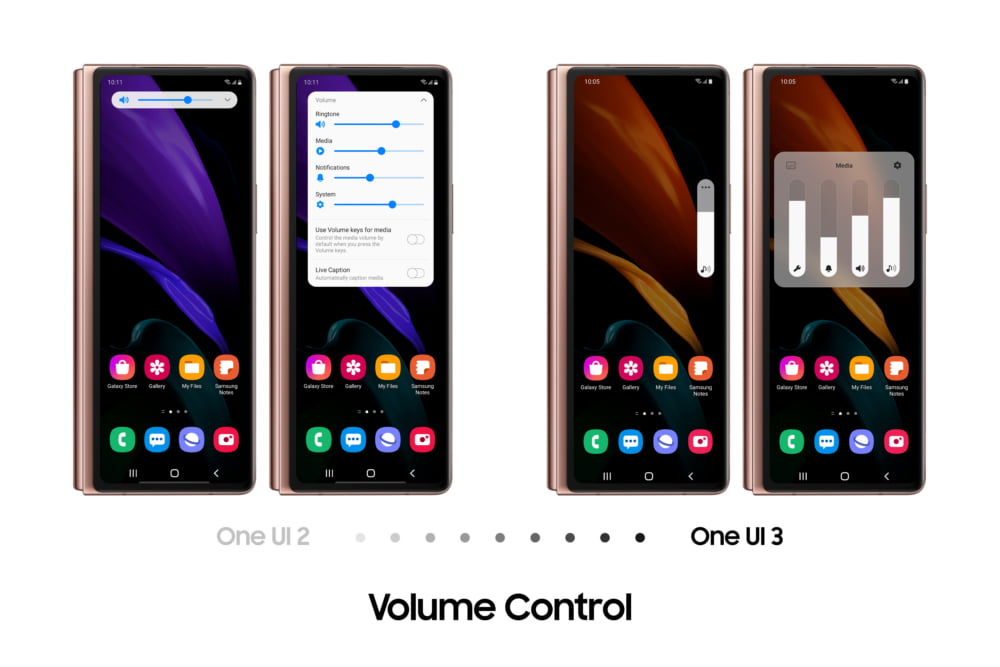
Samsung is bringing One UI 3.1 to the Galaxy Z Fold 2, introducing new features and improved multitasking. The update builds on features we saw introduced to the foldable earlier this year.
Packed with the best of Samsung’s foldable technology, the Galaxy Z Fold 2 introduced a whole host of new smartphone experiences to users. Since December last year, users have been enjoying One UI 3 with Android 11 on the Galaxy Z Fold 2. And now, following the release of One UI 3.1, the foldable experience is about to get even better.
Users can now multitask more efficiently on the Galaxy Z Fold 2. In addition to simplifying everyday interactions on the device, the UX also provides a more natural visual experience. Read on to learn more about the exciting features of the device.

Multitasking Made Easy
On the Galaxy Z Fold 2, users can now instantly return to up to three previously opened Multi-Active Windows on the Main Screen via the Recents tab. Users can also bring two Multi-Active Windows directly from the Main Screen to the Cover Screen via the Recents tab.
Need to reply to an urgent message while checking a document? The latest update allows users to launch Multi-Active Window directly from notifications in the Quick Panel. Just long-press, drag, and drop the relevant notification to open apps with Multi-Active Window.
Simplify Everyday Interactions
The latest update makes routine interactions on the Galaxy Z Fold 2 easier and faster. Users no longer need to reach for the power button to turn off the screen. By enabling the ‘Palm touch to turn off screen’ feature in settings, both the Cover and Main Screen can be put on standby with a touch of the palm or a double-tap.

One UI 3 brings added flexibility to the Camera app. When shooting in Flex mode, the position of the controls can be adjusted for greater comfort. Following suggestions from users, Samsung also added a Delete and Share button to the preview window in Flex mode.
Notifications in the Quick Panel are now categorized, and you can switch between different media controls in the Quick Panel by swiping. The weather widgets on the Cover and Main Screen are also synced so users can get the same information, no matter how they use the phone.

Natural and Comfortable Visual Experiences
The visual experience on Galaxy Z Fold2 s immersive Main Screen is even more comfortable. When making video calls in Flex mode, users can fill the top half of the display with the video of the person they are speaking to. The updated Light and Dark themes bring extra depth to the overall visual experience on the Galaxy Z Fold2 while the redesigned vertical volume slider further minimizes clutter on the screen.
Follow TelecomByte for the latest tech news, also keep up with us on Twitter, and Facebook.
