

iOS 27 brings Siri AI, smarter Photos editing, Safari monitoring, AI image creation and smarter Messages features to compatible iPhones.
Apple has officially released iOS 27 for compatible iPhone models, bringing a major set of changes centred around Apple Intelligence, Siri AI, smarter everyday apps and new ways to edit photos. The update became available on September 14, 2026, and is now rolling out to eligible iPhones.
While iOS 27 includes a large number of smaller improvements, some of its most interesting changes are hidden inside apps that iPhone users already use every day. From a more capable Siri to AI-powered photo editing and smarter Safari browsing, these are five iOS 27 features worth trying first after installing the update.
1. Try the New Siri AI
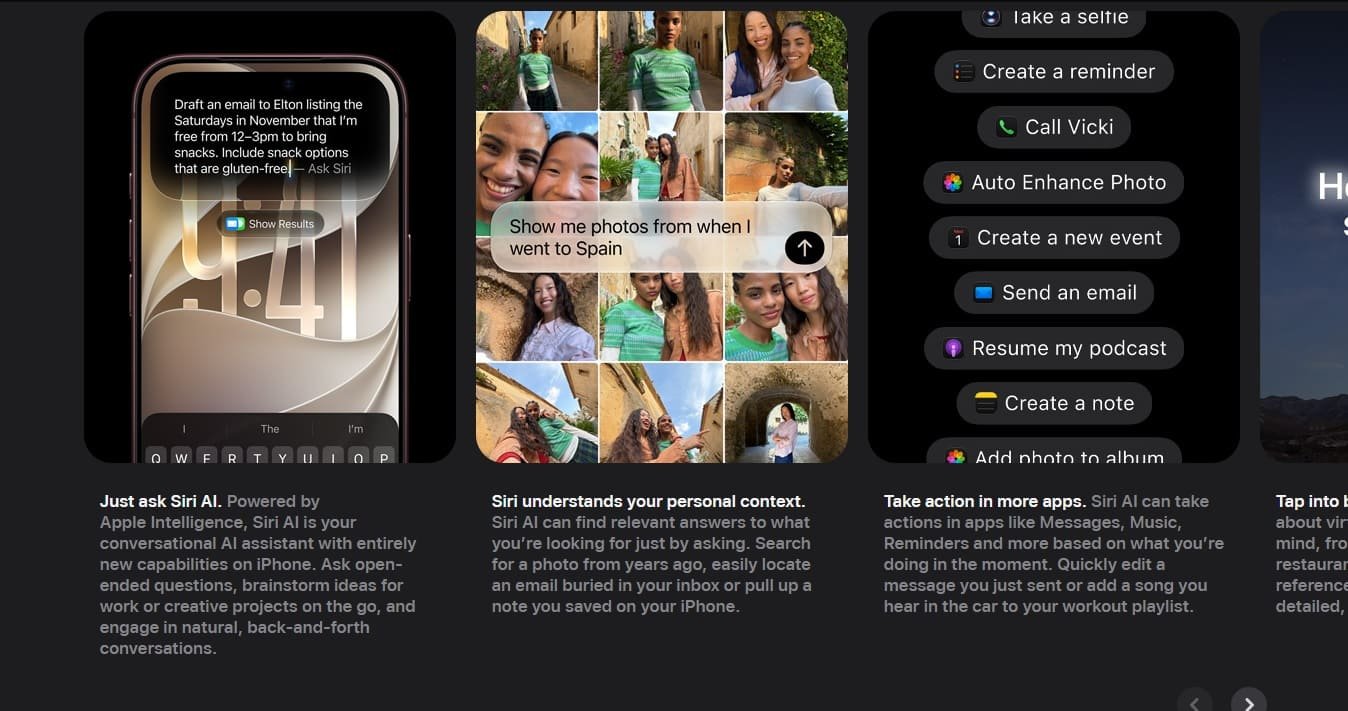
The biggest change in iOS 27 is arguably Siri. Apple has rebuilt Siri around its next-generation Apple Intelligence system, giving the assistant a more conversational experience, broader knowledge and the ability to understand what is happening on the screen.
Siri AI can understand questions about content currently displayed on the iPhone and can use personal context from information such as messages, emails and photos. It can also perform more actions across apps instead of simply answering a question and leaving the user to complete the task manually.
For example, Siri can help locate information from an earlier message or email, answer questions about something displayed on the screen, and help users complete actions across supported apps.
This makes Siri more useful as a general-purpose assistant rather than simply a voice command system.
However, there is an important limitation. Apple says Siri AI is being introduced as a beta, and availability can depend on the device, language and region. Apple Intelligence features also require compatible hardware, so not every iPhone receiving iOS 27 gets every AI capability.
2. Reframe Photos After You Take Them
iOS 27 adds some significant AI-powered editing capabilities to the Photos app. One of the most interesting is Spatial Reframing, which allows users to change the composition of a photograph after it has already been captured.
Instead of simply cropping the image, users can adjust the perspective by touching and dragging the photograph. Apple says the feature uses its spatial understanding to generate the additional content needed when the viewpoint changes.
There is also an Extend tool that can expand an image beyond its original frame. This can be useful when a photograph is too tightly cropped or when you want to change its aspect ratio without cutting away important parts of the original image.
Apple has also upgraded Clean Up, its tool for removing unwanted objects from photographs. The company says the improved version can produce better results when removing distractions from more complicated scenes.
If you regularly edit photos directly on your iPhone, this is one of the first iOS 27 features worth exploring.
3. Let Safari Watch a Website for You
Safari gets one of the more practical additions in iOS 27 with a feature called Notify Me.
It allows users to ask Safari to monitor a webpage for changes and notify them when something important happens. Apple gives examples such as monitoring a product page for a restock or watching for a price change.
This could be particularly useful for people who regularly check online shopping pages, event information or other websites that change periodically.
Safari also gets smarter tab organisation. Apple Intelligence can automatically group open tabs into relevant topics, making it easier to manage a large number of pages.
For example, if you are researching a holiday, Safari can organise related travel pages into a topic and continue adding relevant tabs as you browse.
This could make a noticeable difference for users who frequently end up with dozens of Safari tabs open.
4. Create More Realistic AI Images
Apple is also giving Image Playground a significant upgrade in iOS 27.
The app can now create more realistic images using a new generative model. Apple says users can generate images in different styles and can also modify existing generated images by describing the changes they want or selecting an object directly.
The generated images can be used in places such as Messages, Contact Posters and Lock Screen wallpapers. Users can also select different aspect ratios depending on how they intend to use an image.
Apple says AI-generated images created through Image Playground include a hidden SynthID watermark to help identify them as AI-generated content.
This is one of the more visible demonstrations of Apple’s push into generative AI, particularly for users who already use their iPhone for creating and sharing images.
5. Try Smarter Messages Suggestions
The fifth feature worth trying is the new intelligence built into Messages.
iOS 27 can use the context of a conversation to provide one-tap suggestions for actions. Apple gives examples such as creating a reminder or note based on something discussed in a conversation.
Messages can also help locate relevant photographs when someone asks for pictures. Apple says the system can use information such as keywords, locations and people in the user’s photo library to help find the right images.
Smart Reply in Messages and Mail has also been improved and can draw on a user’s personalised writing style.
These changes are less dramatic than Siri AI or AI image generation, but they could prove more useful in everyday use because they are integrated directly into communication apps.
One Important iOS 27 Limitation to Know
Not every iPhone that supports iOS 27 gets the complete Apple Intelligence experience.
Apple’s Apple Intelligence requirements are more restrictive than the basic iOS 27 compatibility list. Apple says Apple Intelligence and Siri AI require an iPhone 16 model or later, or the iPhone 15 Pro and iPhone 15 Pro Max. Some newer on-device capabilities require even newer hardware.
That means installing iOS 27 on an older compatible iPhone does not automatically unlock all of Apple’s new AI features.
The availability of individual features can also vary by language and region.
Which iOS 27 Feature Should You Try First?
If your iPhone supports Apple Intelligence, start with Siri AI and the new Photos tools. They provide the clearest examples of how iOS 27 changes the way an iPhone can understand information and perform tasks.
Safari’s Notify Me is arguably the most practical new feature for everyday use, while Image Playground is worth trying if you are interested in generative AI.
For everyone else, the smarter Messages features and broader system improvements still make iOS 27 a worthwhile update.
Apple has positioned iOS 27 as more than another visual refresh. Its biggest changes are about making the iPhone more capable of understanding context, helping users complete tasks and adding AI-powered tools to apps they already use.
